For many small and midsize businesses, the traditional approach to IT is simple: Something breaks. Someone calls IT. The problem gets fixed. Everyone gets back to work.
That model makes sense if IT is viewed primarily as technical support.
But today’s technology environment is responsible for far more than fixing printers, resetting passwords, or troubleshooting slow computers. It supports your employees, protects your data, connects your applications, controls access to critical systems, supports compliance requirements, and keeps the business operating.
The most important IT work often happens when nothing appears to be wrong.
That is why proactive IT is not an on-demand service. It is an ongoing business discipline.
What Is Proactive IT?
Proactive IT is the continuous monitoring, maintenance, security, and improvement of an organization’s technology environment before problems disrupt the business.
Instead of waiting for an employee to report an issue, proactive IT looks for problems and risks before they become visible.
That can include:
- Monitoring networks, endpoints, and infrastructure
- Installing software patches and firmware updates
- Identifying and remediating vulnerabilities
- Managing Microsoft 365 and cloud security configurations
- Reviewing user accounts, permissions, and administrative access
- Monitoring security alerts
- Managing endpoint security
- Verifying backups and recovery capabilities
- Maintaining security and compliance standards
- Planning hardware and software lifecycles
- Updating IT policies and procedures
- Developing a long-term technology strategy
At Ocean Solutions, this is a fundamental part of how we approach managed IT. Our team provides proactive monitoring, patching, cybersecurity management, strategic technology leadership, and other services designed to maintain and improve clients’ technology environments rather than simply responding to problems after they occur.
Why Isn’t Break-Fix IT Enough Anymore?
Break-fix IT is no longer enough because many of the most serious technology risks do not cause an obvious problem before they are exploited.
- A vulnerable firewall can continue working.
- An outdated application can continue opening.
- An improperly configured account can continue sending email.
- An unpatched server can continue supporting the business.
From the employee’s perspective, everything may appear normal.
From a cybersecurity perspective, there may be a significant vulnerability sitting below the surface.
The 2026 Verizon Data Breach Investigations Report found that 31% of breaches began with vulnerability exploitation, a 55% increase from the previous year. For the first time in the DBIR’s 19-year history, vulnerability exploitation surpassed stolen credentials as the leading breach entry point.
Source: Verizon, 2026 Data Breach Investigations Report
That is an important distinction.
If your IT strategy begins when someone notices something is broken, a security problem may already have existed for days, weeks, or months without creating an obvious support ticket.
Proactive IT shifts the question from:
“How quickly can we fix this?”
to:
“What can we do to prevent this from becoming a problem?”
Are Small Businesses Really Targets for Cyberattacks?
Yes. Small and midsize businesses are frequently affected by cyberattacks, including ransomware, credential theft, phishing, and vulnerability exploitation.
One of the most dangerous assumptions a growing business can make is:
“We’re too small. Why would anyone target us?”
The answer is that an attacker does not necessarily need to specifically select your organization.
Many cyberattacks are opportunistic.
Attackers can cast wide nets looking for exposed vulnerabilities, compromised credentials, improperly secured systems, or employees who respond to phishing attempts.
Verizon’s 2026 DBIR specifically notes this behavior in its analysis of SMB breaches. Among the ransomware cases where organization size was known, approximately 96% of victims were SMBs.
The same analysis found compromised credentials in 38% of the relevant SMB cases and unpatched vulnerabilities in edge devices in 29%.
Source: Verizon, 2026 Data Breach Investigations Report, SMB analysis
Being smaller does not automatically make a business invisible to attackers.
In some cases, smaller organizations are managing the same types of cloud applications, sensitive information, remote access, financial systems, and connected infrastructure as larger enterprises, but with fewer internal IT and cybersecurity resources.
That makes consistent technology management especially important.
What Is the IT Iceberg?
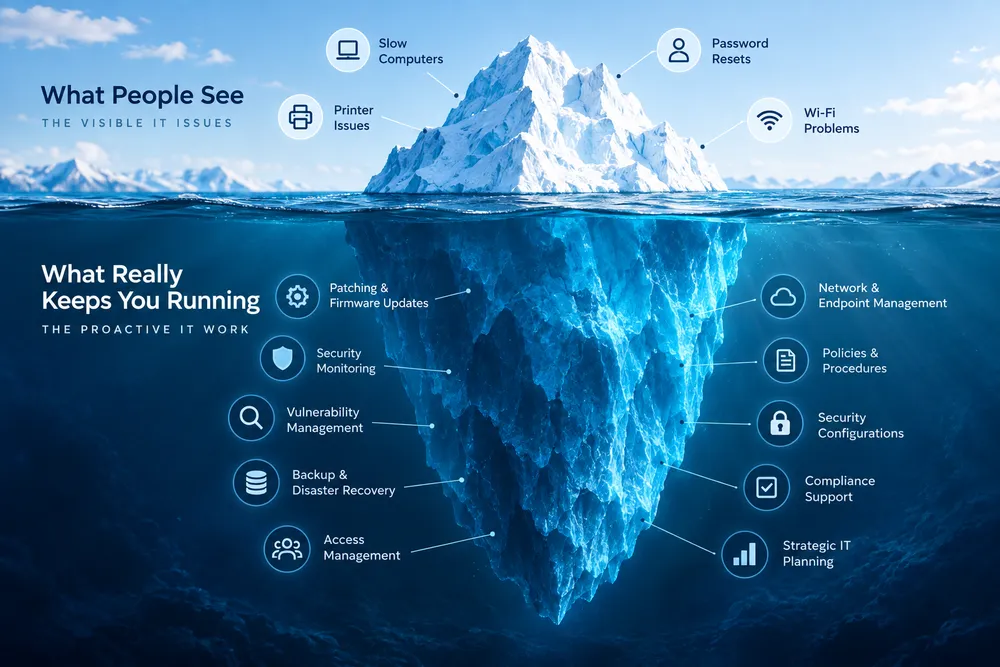
The IT iceberg is a useful way to understand the difference between visible technical support and the ongoing work required to maintain a secure, reliable technology environment.
Think about an iceberg.
Above the water are the IT problems everyone notices:
- A printer stops working
- An employee forgets a password
- A laptop becomes slow
- Wi-Fi stops connecting
- An application produces an error
These problems matter. They interrupt productivity and need to be resolved.
But they are only the visible portion of IT.
Below the surface are the activities employees may rarely see:
- Firmware updates
- Operating system patches
- Security monitoring
- Vulnerability remediation
- Endpoint management
- Backup verification
- Identity and access management
- Microsoft 365 security configurations
- Network monitoring
- Compliance requirements
- Technology lifecycle planning
- Policies and procedures
- Strategic technology decisions
That underwater portion of the iceberg is what helps keep the visible portion functioning.
Ocean Solutions’ managed IT model is designed around both.
Our team supports the everyday technology needs employees experience while also managing the infrastructure, security, monitoring, strategy, and maintenance behind those systems.
Good IT should not only be visible when something goes wrong.
A significant amount of its value should come from what never goes wrong in the first place.
Does Microsoft 365 Automatically Make a Business Secure?
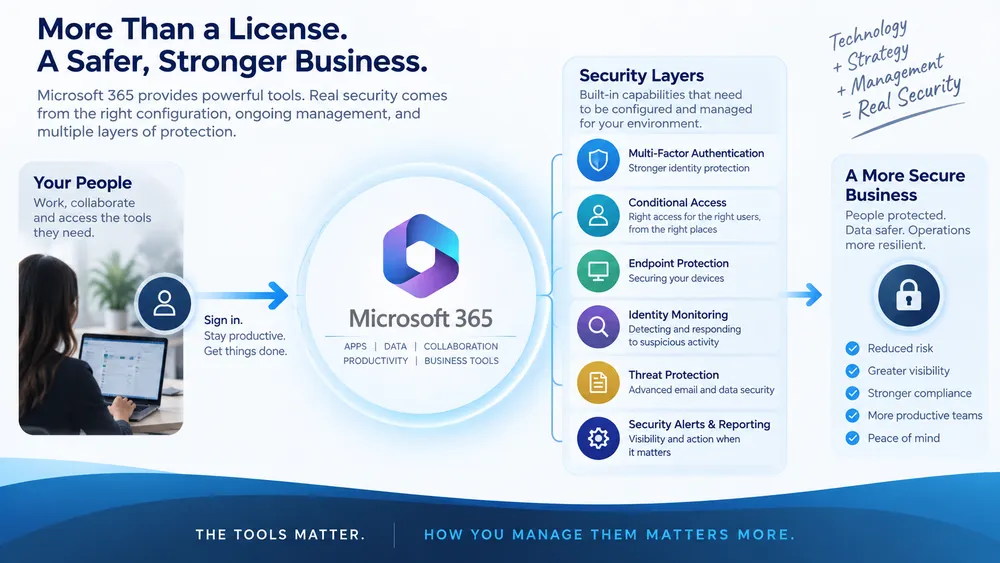
No. Microsoft 365 provides organizations with powerful security capabilities, but those capabilities still need to be appropriately licensed, configured, monitored, and managed.
This is an important distinction.
Buying Microsoft licenses gives an organization access to technology.
It does not automatically create a complete cybersecurity strategy.
Depending on the environment and licensing, Microsoft provides capabilities for identity management, multifactor authentication, Conditional Access, endpoint security, email security, threat detection, administrative controls, and other protections.
Someone still has to determine how those tools should be configured for the organization.
Questions need answers:
- Who has administrative access?
- Do users have more permissions than they need?
- What authentication methods are required?
- What happens when a suspicious login occurs?
- Are security alerts being reviewed?
- Are devices appropriately managed?
- Are former employees’ accounts being disabled correctly?
- Are privileged accounts receiving additional protection?
- Is the organization’s configuration evolving as threats change?
A license cannot make those decisions on its own.
That is one reason managed cybersecurity is part of Ocean Solutions’ broader IT approach. Technology tools become substantially more valuable when they are configured and managed as components of an intentional security strategy.
Can an Attacker Get Into an Account Without the Password?
Yes. Certain attacks can steal authentication tokens or session cookies, allowing an attacker to impersonate an authenticated user without relying on a traditional password login.
This is where modern phishing becomes particularly important.
A traditional phishing attack might attempt to trick an employee into entering a username and password on a fake website.
More sophisticated adversary-in-the-middle, or AiTM, attacks can go further.
The attacker positions malicious infrastructure between the user and the legitimate authentication service. The employee may enter credentials and complete an authentication request, while the attacker intercepts the authenticated session.
Microsoft documented a 2026 phishing campaign in which attackers proxied authentication sessions and captured authentication tokens that could provide immediate account access.
Microsoft specifically notes that this technique can bypass forms of MFA that are not phishing-resistant.
This does not mean MFA is unnecessary.
MFA remains an important security control.
It means businesses should avoid relying on a single security measure as if it makes everything else unnecessary.
Security works in layers.
Identity controls, endpoint security, email security, monitoring, employee awareness, appropriate configurations, least-privilege access, vulnerability management, and incident response all contribute to a stronger environment.
What Does an MSP Do When Nothing Is Broken?
A proactive managed service provider monitors, maintains, secures, and improves a client’s technology environment even when users are not experiencing an obvious IT problem.
This may be one of the most important questions a business can ask its IT provider.
If the answer is essentially “we wait for your call,” the organization is operating with a reactive support model.
A proactive MSP should be working between support tickets.
That can mean monitoring infrastructure, managing patches, maintaining endpoints, investigating security alerts, reviewing vulnerabilities, verifying backups, managing user access, documenting changes, planning technology investments, and identifying risks before they create larger problems.
The Cybersecurity and Infrastructure Security Agency, or CISA, specifically recommends measures such as MFA, strong permission management, secure backups, and careful management of connections between MSP and customer environments.
Source: CISA, Mitigations and Hardening Guidance for MSPs and Small and Mid-sized Businesses
At Ocean Solutions, proactive monitoring and issue resolution are core components of our managed cybersecurity and IT services.
The objective is not to generate more support tickets.
It is to create a healthier technology environment that produces fewer preventable ones.
How Often Should a Business Review Its IT Security?
IT security should be monitored continuously, with recurring reviews of vulnerabilities, access, configurations, backups, devices, policies, and business requirements.
There is no single schedule that applies to every organization.
A 25-person professional services firm will have different requirements from a government contractor, healthcare organization, nonprofit, or global enterprise.
What they have in common is change:
- Employees join and leave.
- New laptops are deployed.
- Applications are introduced.
- Cloud environments change.
- Vendors gain and lose access.
- New vulnerabilities are discovered.
- Attack techniques evolve.
- Business requirements change.
A security strategy that was appropriate when it was created may not remain appropriate indefinitely.
Verizon’s 2026 research illustrates how quickly that landscape is moving. In addition to the increase in vulnerability exploitation, the report found that the median time required to fully remediate a critical vulnerability had reached 43 days.
Source: Verizon, 2026 DBIR and Breach Impact Study SMB Infographic
Cybersecurity therefore cannot be treated as an annual checkbox.
It is maintenance.
What Are the Business Benefits of Proactive IT?
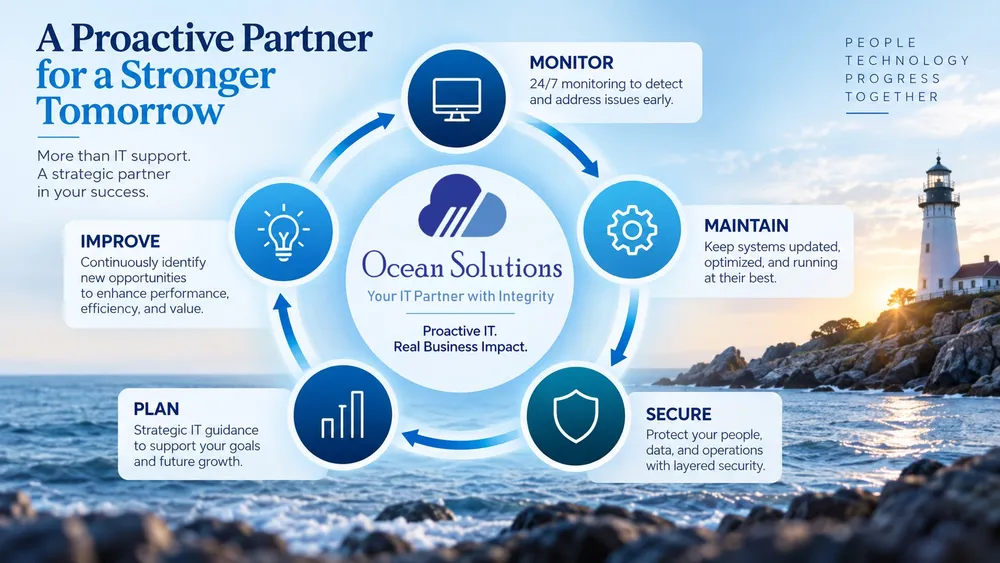
Proactive IT helps organizations reduce preventable technology disruptions, strengthen cybersecurity, improve technology planning, and give employees a more reliable environment in which to work.
The value goes beyond cybersecurity.
When technology is proactively managed, leadership can make decisions based on the condition of the environment rather than waiting for a failure to force action.
- Aging hardware can be replaced strategically.
- Licenses can be managed intentionally.
- Security risks can be prioritized.
- Technology budgets can become more predictable.
- Backups can be verified before an emergency.
- Infrastructure can be planned around growth.
Employees can spend less time dealing with recurring technology problems.
This is where managed IT becomes more than outsourced technical support.
Ocean Solutions provides fully managed and co-managed IT services designed to augment existing IT departments or serve as the IT presence for organizations that do not maintain one internally.
That includes day-to-day support, but it also includes network monitoring, managed cybersecurity, backup and recovery, IT audits, software license management, vendor management, change management, Virtual CIO services, and strategic technology guidance.
The goal is to connect the technology environment to what the organization is actually trying to accomplish.
Frequently Asked Questions About Proactive IT
What is proactive IT?
Proactive IT is the continuous monitoring, maintenance, security, and improvement of technology systems before problems disrupt business operations.
What is the difference between proactive and reactive IT support?
Reactive IT responds after a technology problem occurs. Proactive IT continuously monitors and maintains systems to identify vulnerabilities, outdated technology, configuration issues, and other risks before they become larger problems.
Does a small business need managed IT services?
A small business may benefit from managed IT when it depends on technology but lacks the internal resources or specialized expertise required to continuously support, monitor, secure, and plan its IT environment.
Is Microsoft 365 secure enough by itself?
Microsoft 365 provides extensive security capabilities, but businesses still need to appropriately configure, monitor, and manage those controls. A Microsoft license alone does not replace a broader cybersecurity strategy.
Can phishing bypass MFA?
Some adversary-in-the-middle phishing attacks can intercept authenticated sessions and bypass forms of MFA that are not phishing-resistant. Microsoft has documented attacks that capture authentication tokens and use them to gain account access.
Why do businesses need vulnerability management?
Vulnerability management helps organizations identify, prioritize, and remediate weaknesses that attackers could exploit. Verizon’s 2026 DBIR found vulnerability exploitation was the initial access vector in 31% of breaches.
What should an MSP be doing when nothing is broken?
A proactive MSP should still be monitoring systems, managing patches, reviewing security alerts, remediating vulnerabilities, managing endpoints and access, verifying backups, documenting changes, and helping leadership plan future technology needs.
How often should cybersecurity be reviewed?
Cybersecurity should be continuously monitored, with recurring reviews based on the organization’s environment, risk profile, compliance requirements, technology changes, and emerging threats.
Proactive IT Is Part of Running a Modern Business
The printer problem is easy to see. The unpatched vulnerability is not.
The forgotten password gets reported. The unnecessary administrative permission may not.
The slow laptop generates a support ticket. The stolen session token may look like the legitimate employee signing in.
That is why the most important question to ask about IT is not simply:
“Who do we call when something breaks?”
It is:
“Who is responsible for making sure our technology remains healthy, secure, and aligned with the business when nothing appears to be wrong?”
That is the role proactive managed IT should play.
Ocean Solutions provides managed and co-managed IT, cybersecurity, monitoring, strategic technology guidance, and ongoing support designed to help organizations maintain the technology environments their people and missions depend on.
If your current IT model starts when something breaks, it may be time to look at what is happening below the surface.
Talk with Ocean Solutions about building a more proactive IT strategy.